Engineers working in silos hinder their full potential




Problem Context
In response to the growing demand for streamlined development processes and improved collaboration between developers and various stakeholders, Kimberly-Clark has initiated the DevEx Unified Platform. This platform aims to enhances the developer working experience and accelerates the software development lifecycle.
How do we enhance developer experience in a global enterprise?
Leadership has set an ambitious goal: make developers' work experience better to boost productivity. But here’s the catch—what does ‘better’ actually mean? What problems are we solving? The leadership request is vague, and we need to navigate through that ambiguous statement.

1. Debrief Project Statement
From the project statement crafted by our PM and leadership, we gather key insights about user groups and the features leadership envisions—features they assume will improve our engineering team's daily operations.

2. Research Validation
Building on the identified user groups and planned features, we developed a tailored research framework for each group—focusing on their workflows, challenges, and coping strategies.

3. Product Scoping
With 112 pain points gathered across six personas, we prioritize design features based on their frequency and the breadth of their impact across all user groups.
What do we aim to understand from user interviews?
What does the user’s current workflow look like?
What roadblocks are they facing?
How do they work around those challenges?

Through 4 semi-structured interviews with each user group, we’re not just identifying individual pain points but treating them as an IT ecosystem and uncovering overlapping and interconnected issues to dig into the root causes behind these challenges.
What dev teams are not experiencing well currently?

Developers
-
Insufficient clarity from business teams on requirements and data needs.
Misalignment leads to delays in later development stages.
-
Teams may need to use tools incompatible with their skill sets.
Example: API changes require Java expertise, but only one team member knows Java, causing bottlenecks.
-
Global solutions struggle due to region-specific data, affecting UI consistency.
-
Missing guidance on functionality purpose, target regions, development details, and user manuals.
Slows down knowledge sharing and onboarding (e.g., VS Code setup takes 2-3 weeks).
Clients struggle to understand and use functionalities without proper manuals.

DevSecOps
PM
-
Project scope get expanded in the middle of the process
-
Business partners don’t understand roadmap timeline is an estimation
-
Not enough engineers to complete tasks within the time frame

-
Optimal technical solutions may be compromised due to the absence of SA input early in the process.
-
Slow and demanding approval procedures hinder innovation at KC.
-
No dedicated space for storing and accessing reusable architecture diagrams.
-
Issues arise not from technical blockers but from developers' lack of expertise.
Support teams struggle to fix problems, often leaving SAs to resolve them themselves.

QA
-
No sustainable QA framework been used by developers
-
QA needs to schedule additional calls to clarify discrepancies between documentation and the actual application functionality.

Solution Architects
-
Leads to complex, tangled code that is hard to maintain.
Results in higher maintenance costs and lower code quality.
Diverts resources from innovation and slows down overall progress.
-
Some requests require infrastructure or platform teams, which DevSecOps cannot resolve alone.
-
Developers struggle to determine the right conditions to raise incident requests.
Issues in Dev environments often delay work in QA and production.
-
Developers and DevSecOps struggle to track incident statuses, causing delays and misalignment.
Scrum Master (coming soon)
-
New joiners face delays in getting access and necessary tools, impacting their productivity.
-
With so many pain points across six different user groups, how do we know where to focus our problem-solving efforts?
1.Mapping pain points based on developers journey
Narrowing the problem-solving scope by focusing on the most critical pain points during the requirement evaluation phase and code development phase.

2. Mapping overlapping user journeys to identify key problem-solving scenarios
Focusing on the execution phase , a highly collaborative stage requiring coordination across multiple user groups. Prioritizing the deployment phase, a critical dependency that determines the success of collaboration efforts.
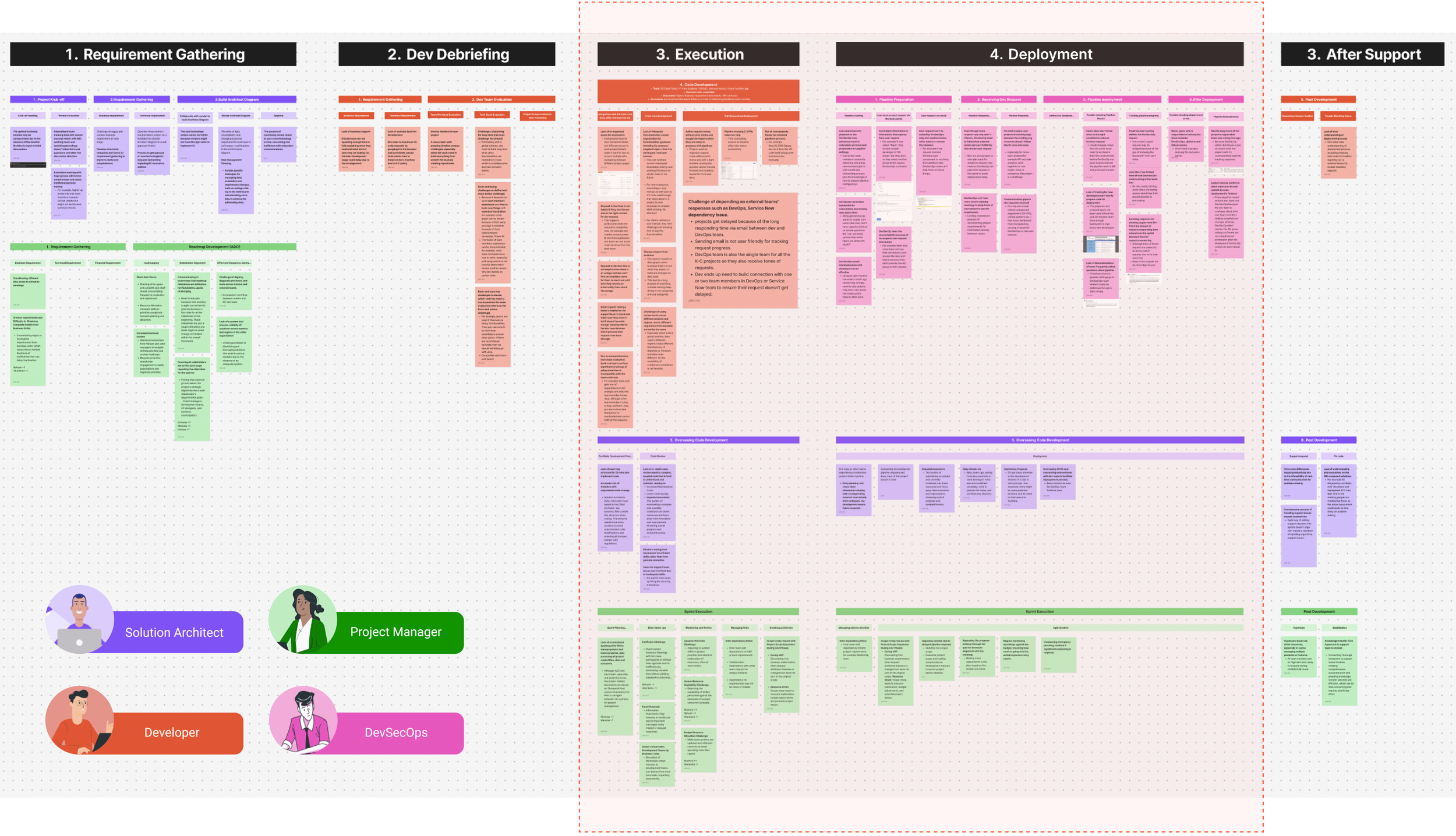
Adjust the requirement-gathering focus after identifying that shifting priorities and ad hoc projects arise from PMs and Solution Architects struggling with evolving business needs, driven by leadership and structural challenges that lead to undesirable scope expansion.

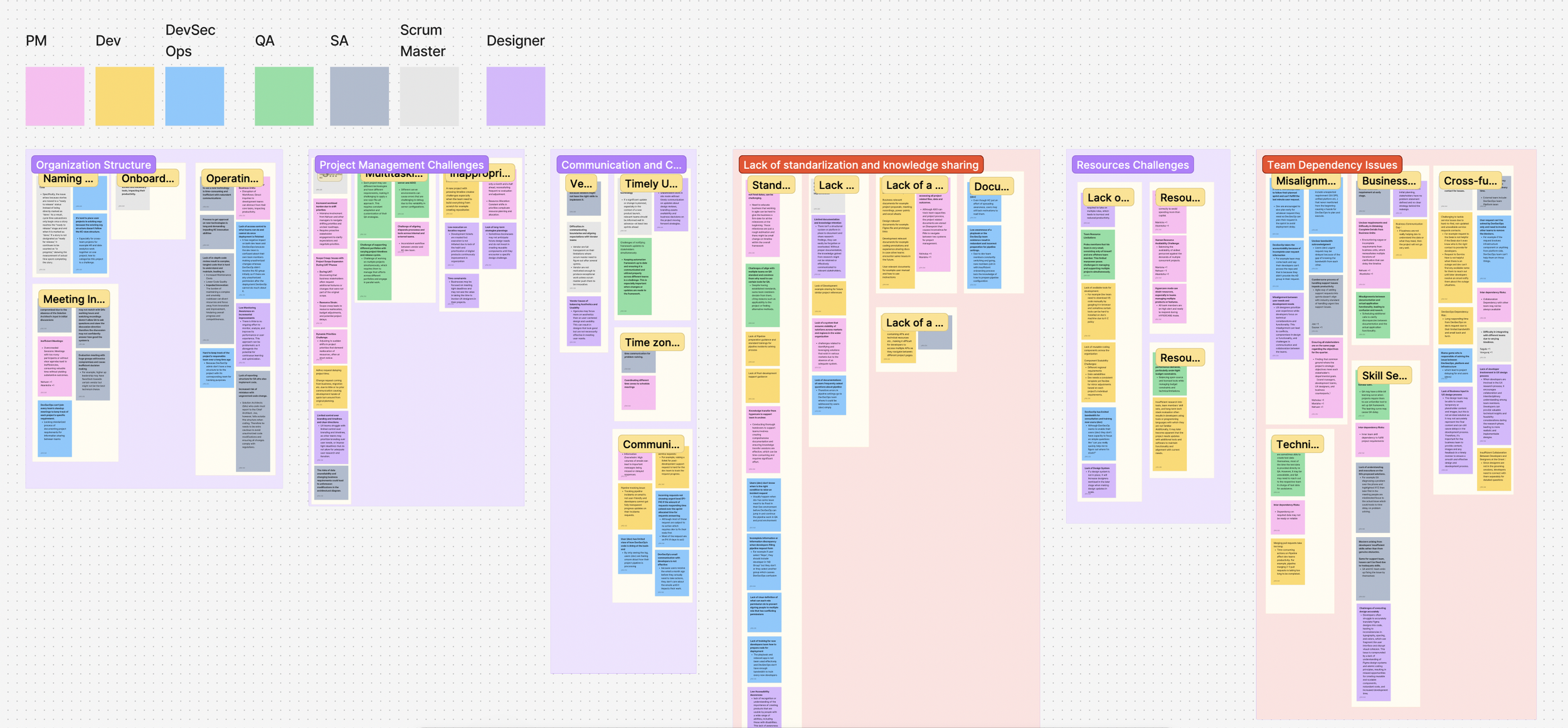
3.Categorizing pain points from key problem-solving scenarios for design workshops.
Grouping similar pain points help us discover user challenge patterns in execution and deployment stages, including lack of standardization, knowledge sharing, and team dependency issues. These categories, with their subcategories, guide our design solution brainstorming workshop.
With a clearly defined product scope, we launched co-design workshops with key stakeholders to assess solution feasibility from technical and business perspectives.


We reached the following alignment from the workshop:
Stakeholders raised concerns about evaluating developer skills, citing its sensitivity and execution challenges across organizational levels.
Instead of attempting to eliminate cross-team dependencies through access shortcuts, we designed for transparency—using self-service object relationship diagrams to surface ownership and unblock collaboration at scale.
DevSecOps pipeline request tracking streamlines inefficient emails with a transparent, standardized process, offering high value to multiple user groups and being easy to implement.

Stakeholders strongly support knowledge sharing but are unsure about the ideal format. Research shows users avoid lengthy documents, while creating engaging training materials requires resources the company lacks.
Rather than relying on text-heavy tutorials, we focused on creating reusable pipeline configuration templates that developers can adopt early and extend later. This approach enables scalable, standardized compliance while fitting naturally into existing development workflows
Design Goals
An end-to-end automated pipeline deployment flow—from self-service setup to failure handling and resolution—supporting collaboration between developers and DevSecOps.
A centralized components management space to view, share, and access dependency resources to help teams learn and collaborate
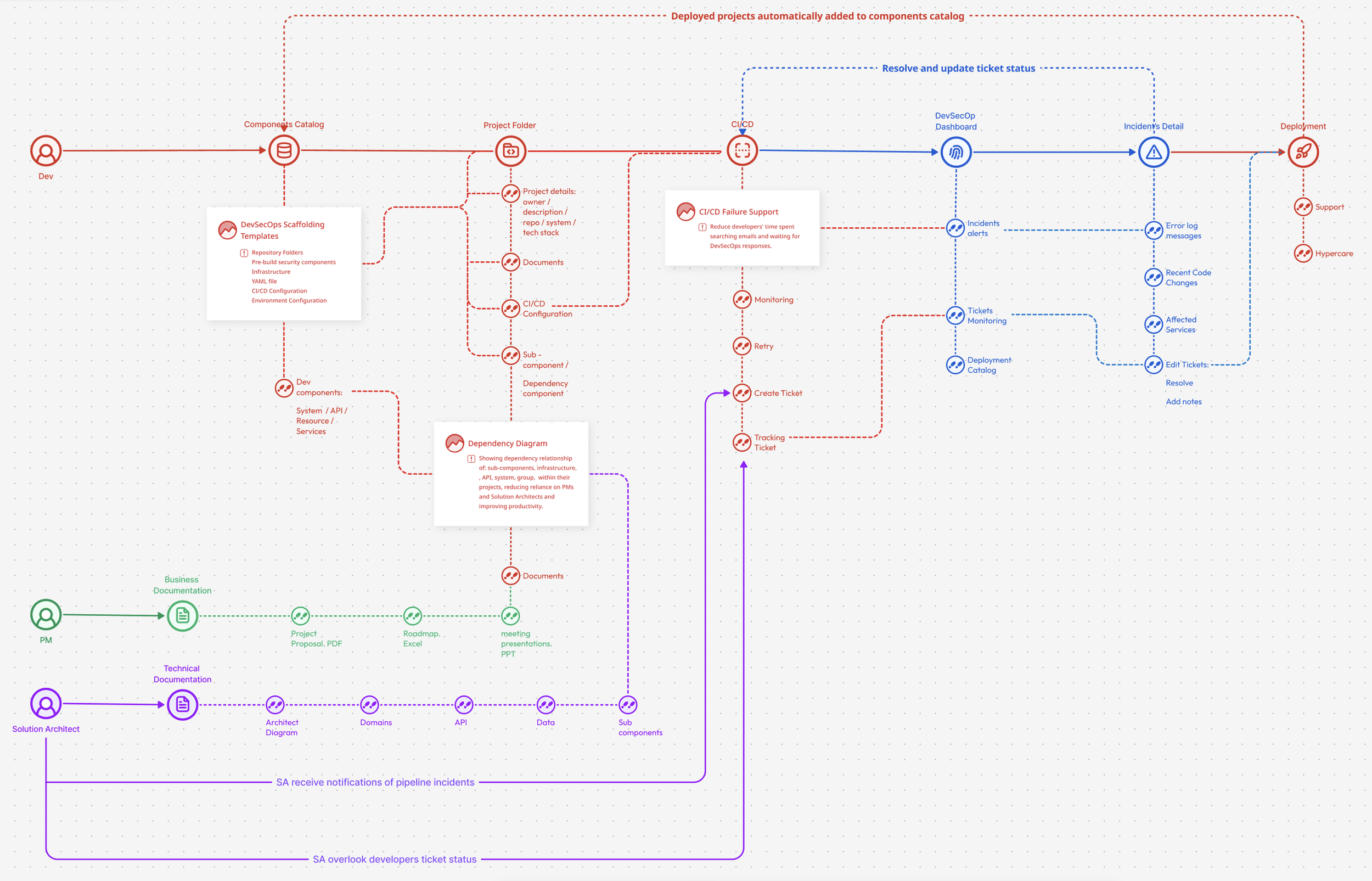
To help us visualize the aligned solutions and interaction flows between different user groups, we mapped the product structure to highlight key solution areas.
The user flows outline key features within a multi-step architecture, providing clear guidance for the design and development lifecycle.

With outlined design solutions and interaction maps, we created high-fidelity prototypes inspired by market trends and collaborated with developers for technical input.
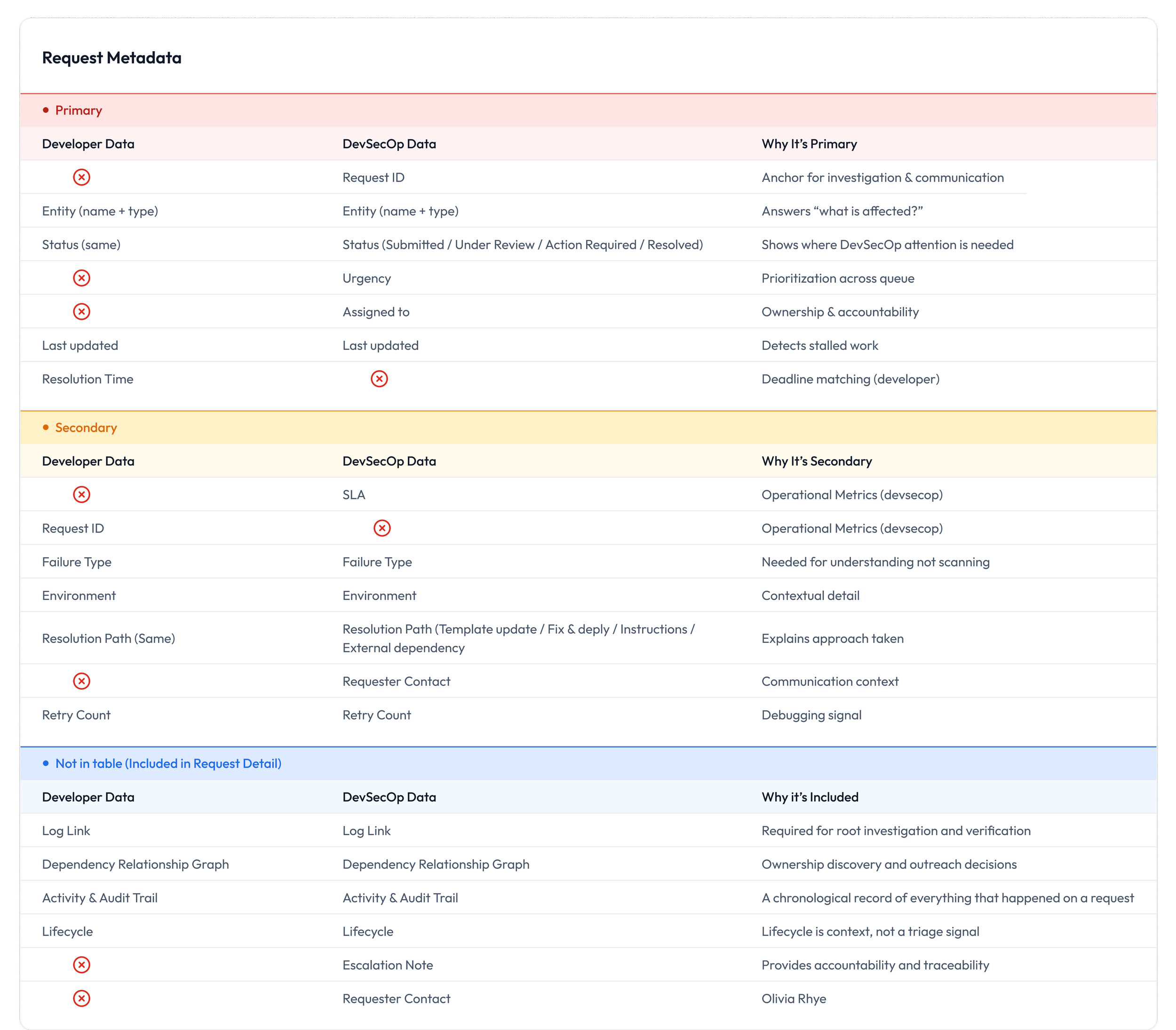
Organizing Metadata Details
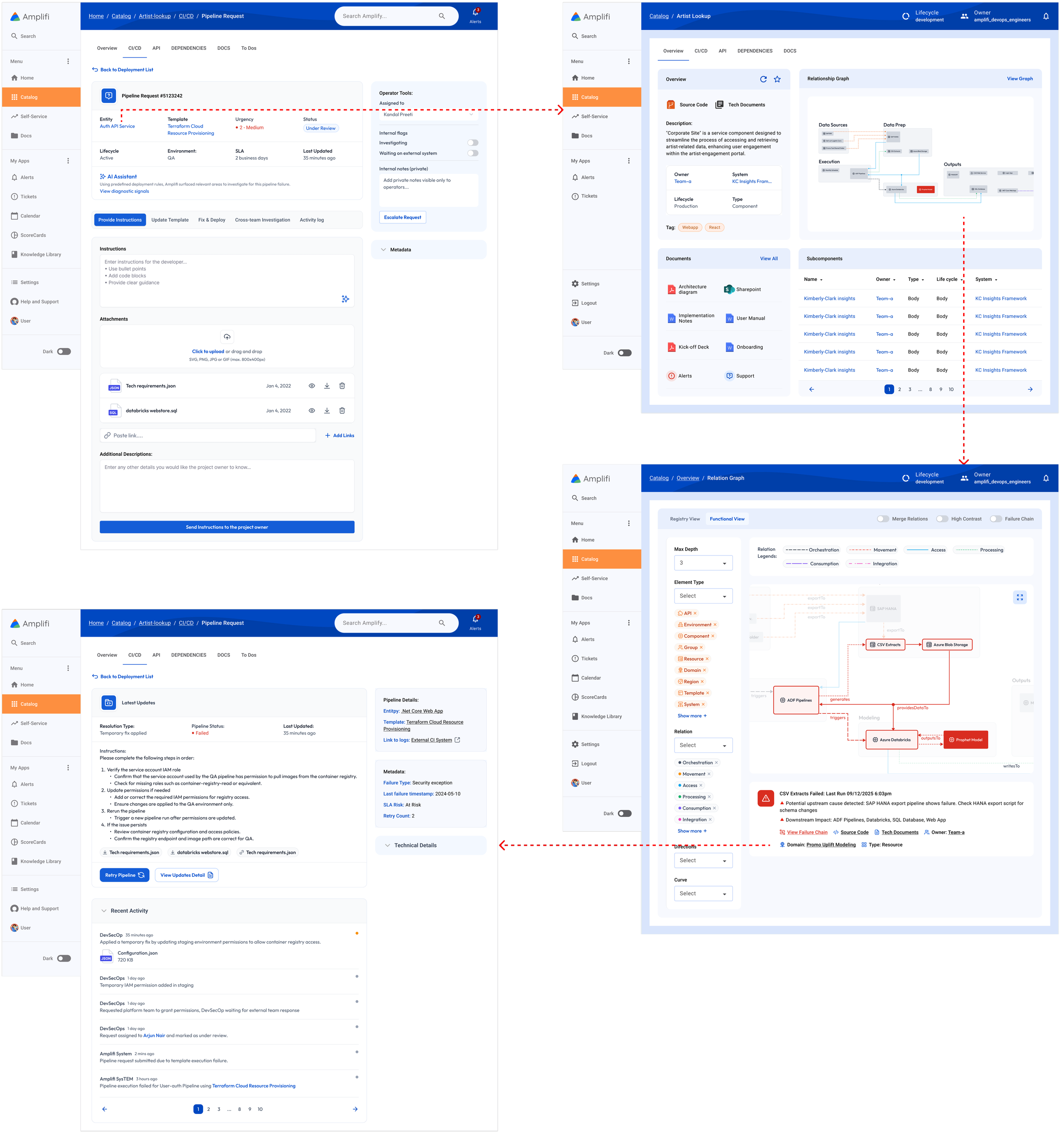
Created a unified pipeline request metadata inventory across developer and DevSecOps views, enabling a clear separation between overview (request list) and action-oriented (request detail) layers.
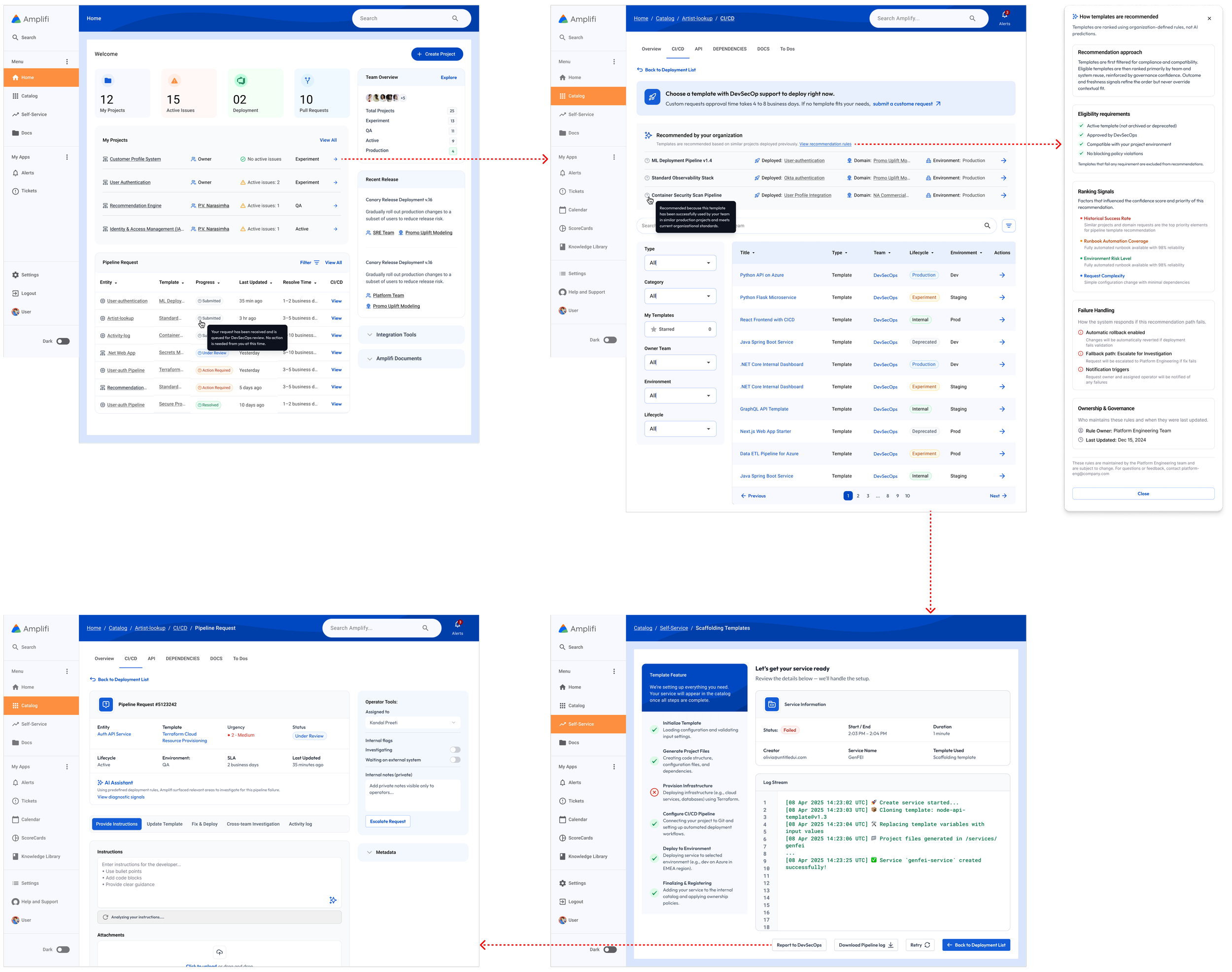
Feature 1: Self-service deployment and developer request journey
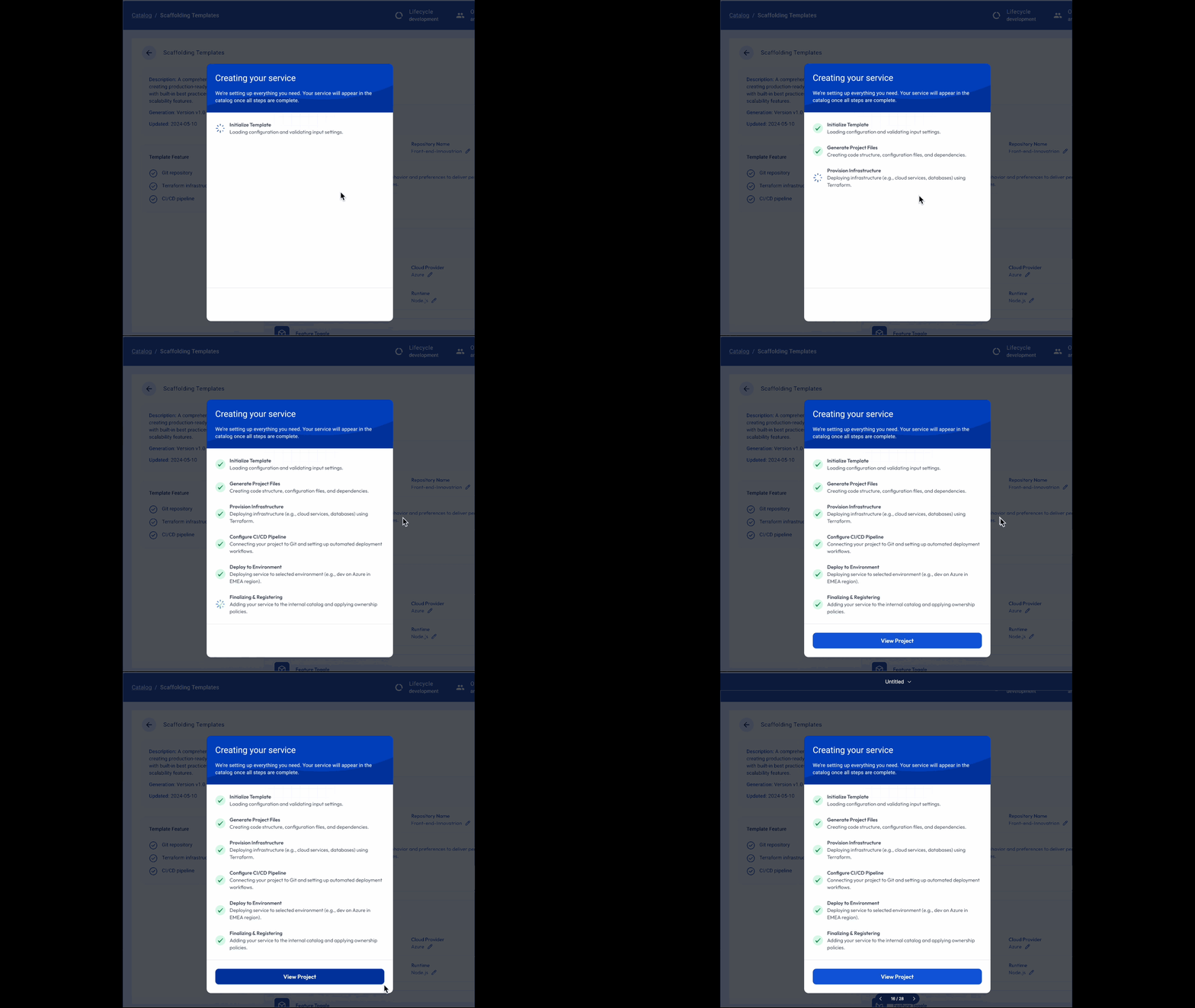
Amplifi enabled scalable governance for standardized code deployment by curating team-proven templates, encouraging reuse with minor adjustments and reducing unnecessary DevSecOps requests while improving version control and operational efficiency.
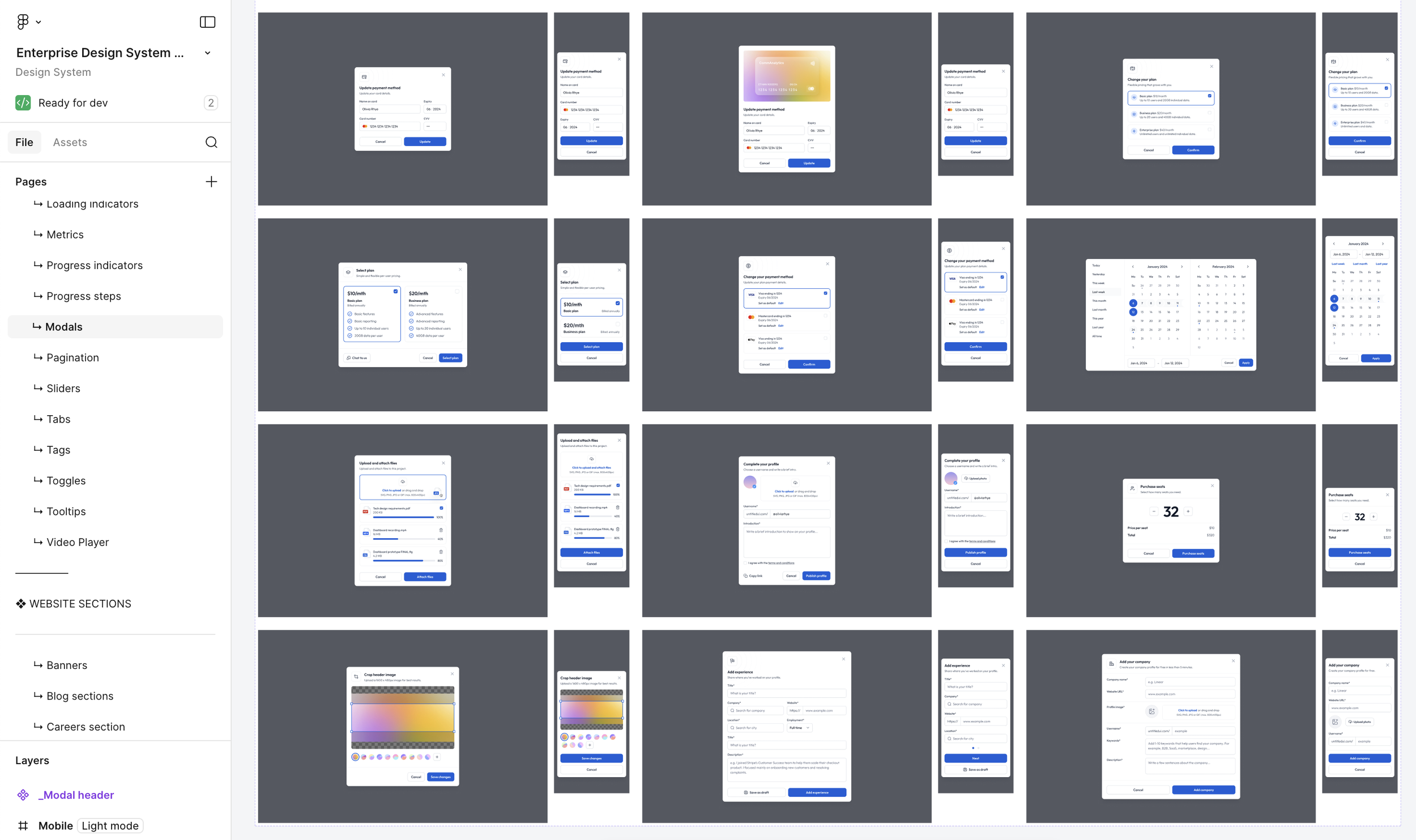
Utilizing enterprise design for quick prototype
To ensure consistent design patterns across enterprise products, we leveraged the design system to build production-ready UI directly in high fidelity—skipping low-value wireframes and accelerating iteration.
Feature 2: Entity based request system
Amplifi anchors every request to enterprise IT entities, automatically inheriting ownership, dependencies, and historical context—enabling DevSecOps to deliver faster, more accurate resolutions with full traceability.
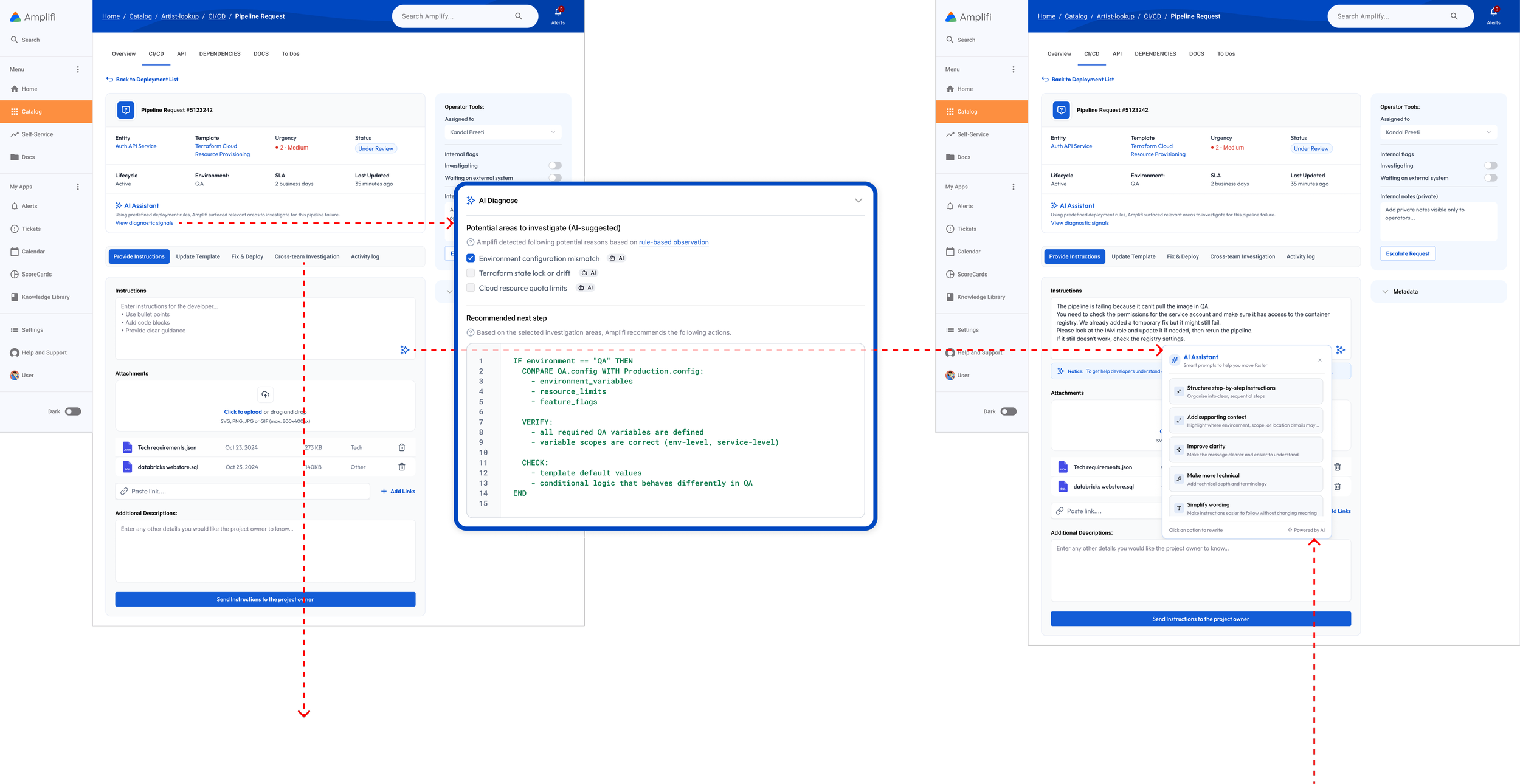
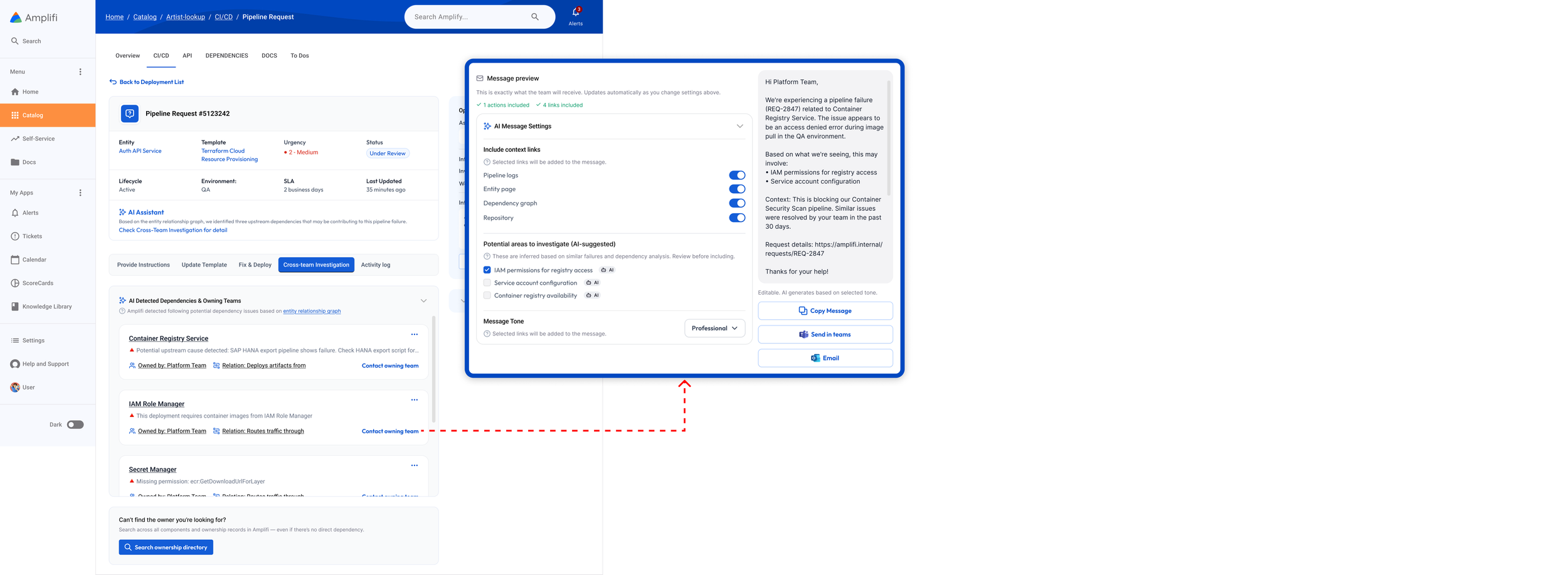
Feature 3: AI recommendation on request solutions
The entity-based context model provides the structured metadata needed to support AI-driven quality check, problem summarization, and auto-generated instructional messages supported by pre-populated request details facilitating cross team communication on problem solving.
Although developers review the design throughout the process, additional support is needed for seamless implementation.
Design Specification
Despite the design system, annotations help clarify details like colors, logo formats, and icon names, enabling developers to quickly locate assets.

Launched Impacts
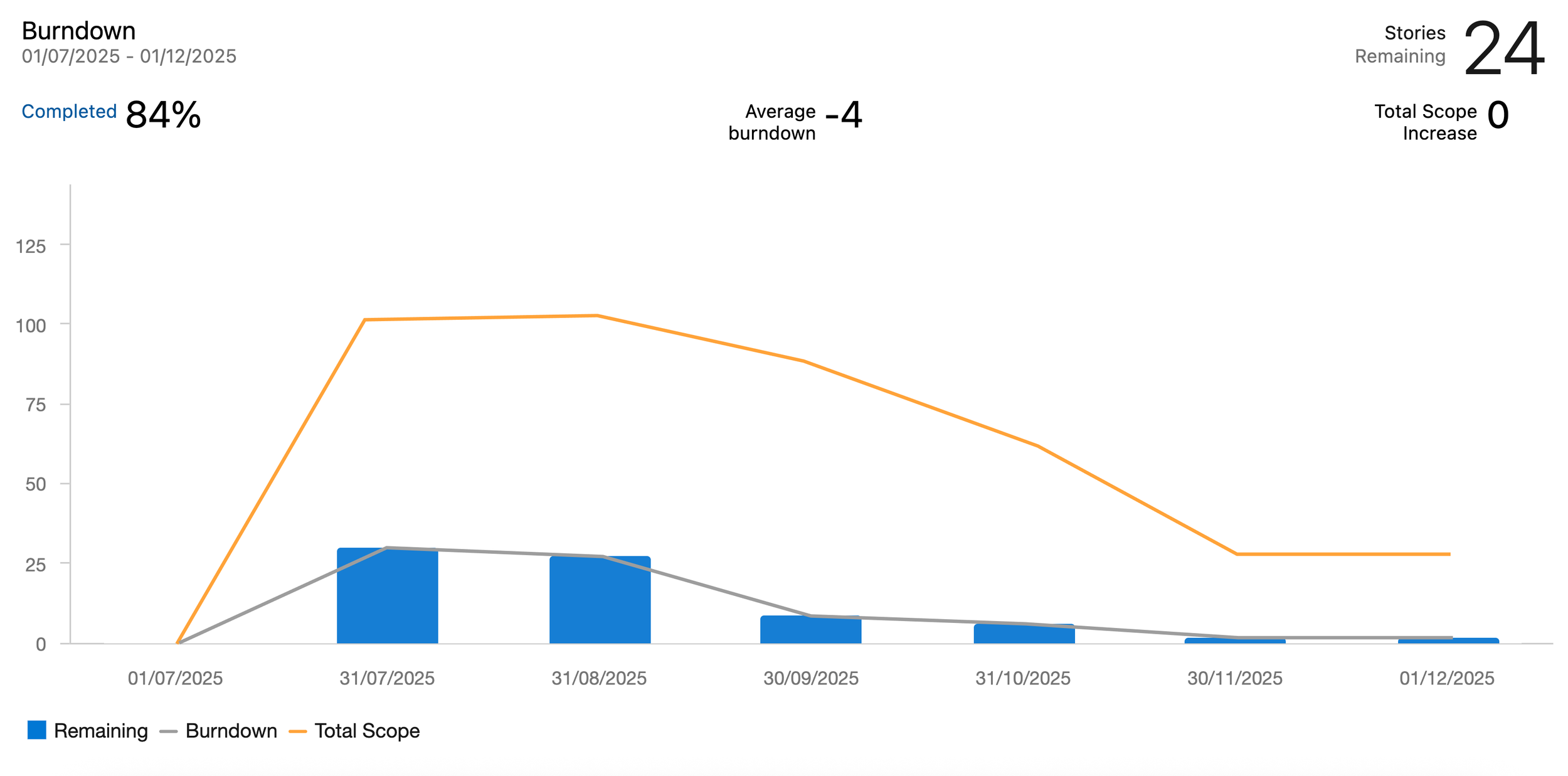
Amplifi launched with NA DTS developers and showed steady traffic growth in its first 90 days, alongside strong retention as teams continued to explore and reuse the platform. By introducing reusable pipeline templates, Amplifi shifted repetitive setup work into self-service flows, allowing DevSecOps to focus on fewer, custom requests—reducing sprint scope and restoring predictable burndown patterns.

Like the development lifecycle, design evolves beyond launch. We conduct usability tests to continuously improve it.
Thanks to our initial research connections, we re-engaged interviewed users for usability testing, assessing three key areas:

Product Navigation – Amplifi’s parent-child structure and dependency diagrams allow seamless component switching but may challenge users in retracing their steps.
Ease of Use – Despite leveraging familiar design patterns, we ensure Amplifi remains intuitive, enhancing efficiency without adding a learning burden.
Goal Achievement – Ultimately, we validate whether Amplifi effectively addresses dependency issues and knowledge-sharing challenges identified in our research.
Pros and Cons
Users find the dependency diagram valuable for viewing related components and owners to address dependency issues. However, they suggested including key stakeholders, as owners alone may not always resolve issues.
As interest in the diagram grew, users requested additional features such as database and vendor program integration as those entities often connected with the failures of IT project deployment and need to be addressed by DevSecOp.


Navigation & Ease of Use:
Users value a centralized platform for development information, reducing reliance on SharePoint, emails, and Teams. However, they struggle to return to the first-viewed component, highlighting the need for a robust breadcrumb system.
Additionally, a basic onboarding guide remains valuable for helping users quickly adapt and gain confidence in using the product.
